Email Service for Student (KUMOI)
Kyoto University Mail for Student (KUMOI) is an email service provided to students of the university together with student accounts (ECS-ID). Important emails such as emergency calls will be sent from the university, so please be sure to read them.
Anyone with an ECS-ID, such as a part-time lecturer, can use it.
Features
- We use Microsoft 365 for student email.
- You can log in to the mail environment with your ECS-ID.
- Email sending limit: 25MB(*) including attachments by default
- Inbox (mail spool) capacity: 100GB(Non-Student:50GB)
- See Integrated Cloud Services for other services available with Microsoft 365
News
To use this service, you need to set up multi-factor authentication with your university-wide account (ECS-ID/SPS-ID).
Please also refer to Multi-Factor Authentication for more details.
1. Email address
Your new e-mail address is notified by accessing the following
After logging in to your student email, you can check it from the link in the top-right corner when using a PC.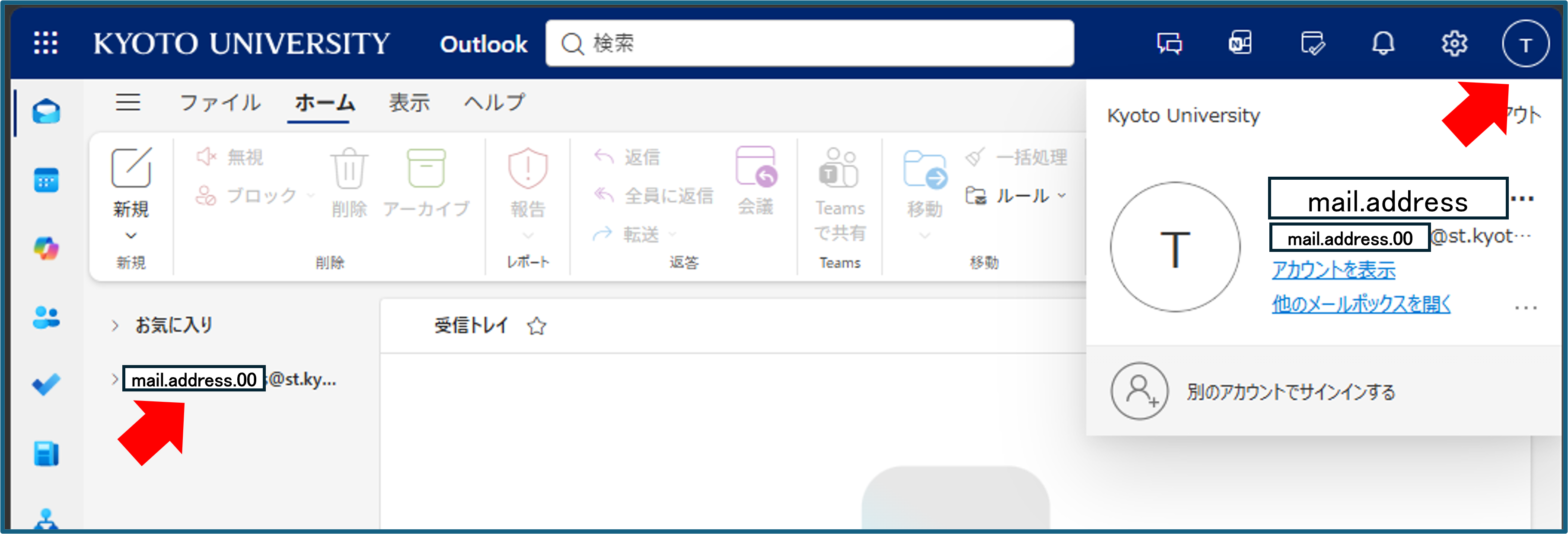
If you are using the Outlook app on a smartphone, you can access it from the icon in the top-left corner.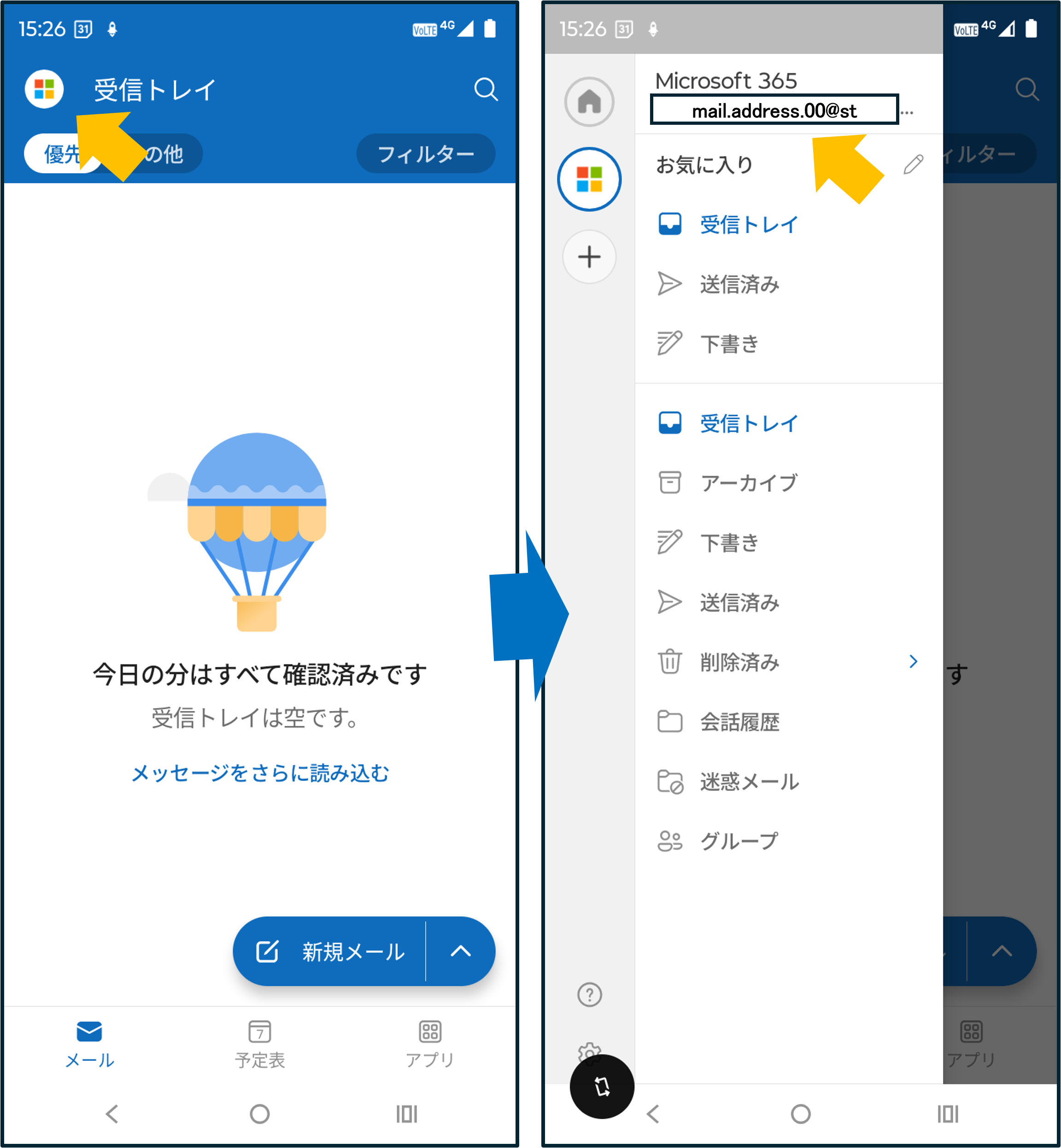
note:
In principle, Email address cannot be changed.
In cases of obvious errors or name changes, please confirm the name data held by your affiliated department, which serves as the basis for generating the address, with the academic affairs contact window of your affiliation. After consulting about the change to a different email address and obtaining permission, please use the inquiry form to seek further assistance.
2. How to use
User Manual
Email Service for Student User Manual(PDF)(2026/09/09)
Use in web browser
- ID: ECS-ID
- PASSWORD : Password for ECS-ID
Use in email software
We recommend using a web browser for student emails, but you can also read emails with general email software POP/IMAP/Exchange.
In your email software, please make the following settings for receiving and sending emails. If you can't connect with POP/IMAP OAuth2 (advanced authentication), please use the Exchange connection described at the bottom of this page.
note: You cannot connect to and send/receive from Gmail because it does not support these authentication methods.
OAuth2 (advanced authentication)
| Incoming | Outgoing | |
| Protocol | IMAP or POP | SMTP |
| Server | outlook.office365.com | smtp.office365.com |
| Port | 993(IMAP)/995(POP) | 587 |
| SSL | SSL/TLS | STARTTLS |
| Authentification | OAuth2 | |
| User Name | your.name.a12@st.kyoto-u.ac.jp Your mail address | |
When connecting to KUMOI from Mac OSX's standard mail application, there have been many reports of problems such as not being able to receive emails with exchange, imap, pop, or send emails with smtp. If you cannot connect, please use the web or use an email tool such as Thunderbird.
3. Get Started
Students do not need to apply as they will be given the right to use the ECS-ID at the time of admission.
For part-time lecturers and others, it is necessary to apply for an ECS-ID, so please apply for an ECS-ID from the student/part-time lecturer account (ECS-ID).
4. Connection example
POP/IMAP(OAuth)
- How To Connect to Student Mail KUMOI from Thunderbird(OAuth) (PDF)(2026/09/10)
Exchange
- How To Connect to Student Mail KUMOI from Outlook(Exchenge) (Windows)(PDF)(2026/09/10)
- How To Connect to Student Mail KUMOI from Outlook(Exchenge) (MacOS)(PDF)(2026/09/10)
- How To Connect to Student Mail KUMOI from the MacOS Mail App(Exchenge) (PDF)(2026/09/10)
- How To Connect to Student Mail KUMOI from Outlook in Android(Exchange)(PDF)(2022/05/17)
- How to Access KUMOI from iPad Mail App(Exchange)(PDF)(2023/04/11)
5. Forwarding email to another email account
There has been an increase in cases where emails are not delivered to forwarding destinations when email forwarding is used.
There have also been cases where users are unable to send replies from their forwarding destinations.
Therefore, please use your student email account directly for checking and sending/receiving emails, rather than relying on email forwarding.
Previously, email forwarding was configured via the “Kyoto University All-in-One Account Management” screen. However, due to technical limitations, there have been an increasing number of cases where forwarded emails are incorrectly classified as spam at the destination or fail to be delivered.
Accordingly, we would like to inform you that email forwarding should now be configured using the Outlook forwarding function as described below.
Please log in to KUMOI via
https://outlook.com/st.kyoto-u.ac.jp
From the top-right corner, select [⋯ (More options)] → [Settings] → [Mail] → [Forwarding], and configure the following settings:
- Turn on Enable forwarding
- Enter the destination email address in Forward my email to
- Check Keep a copy of forwarded messages
Click Save
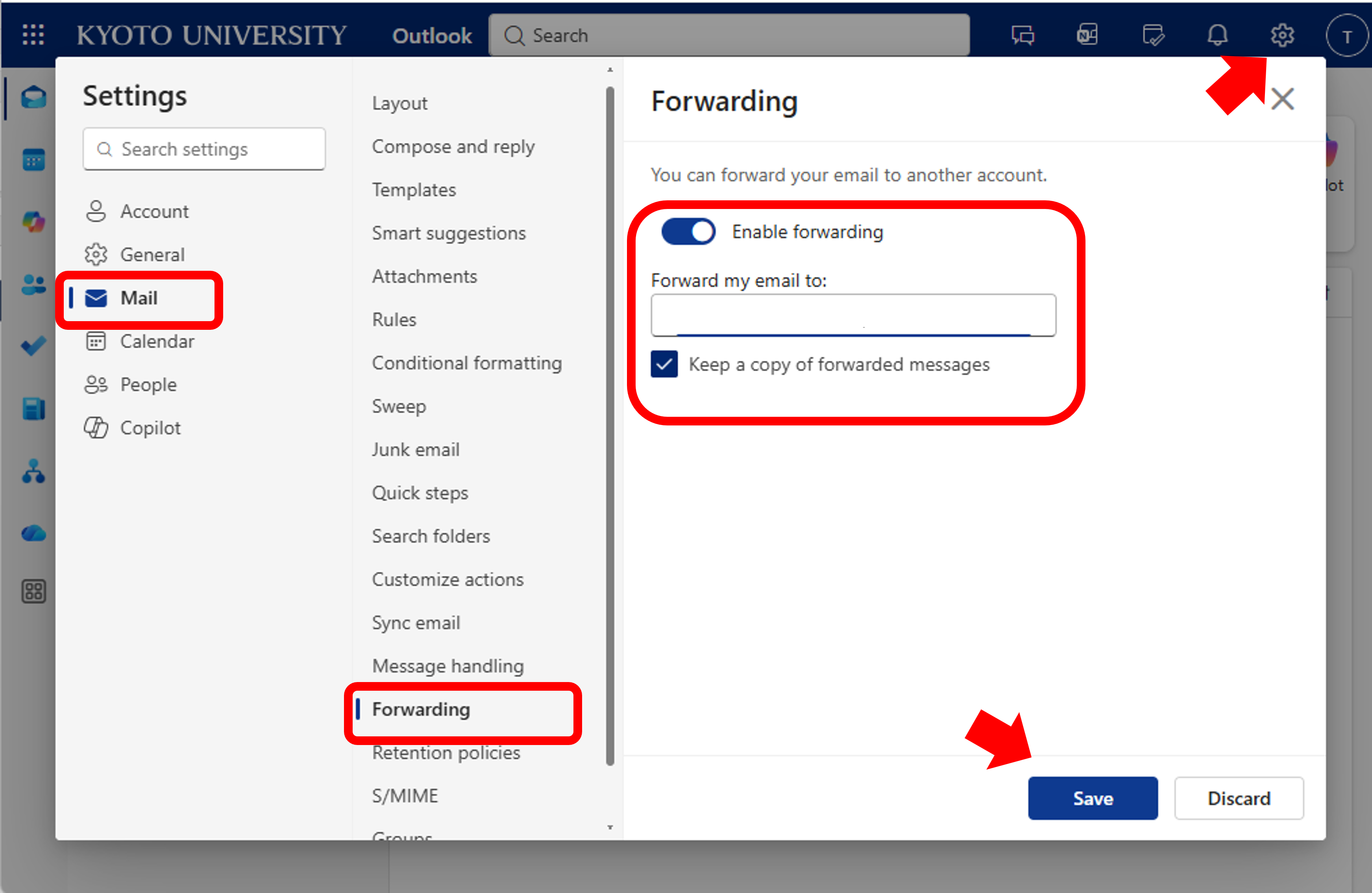
It is essential that you always enable “Keep a copy of forwarded messages.”
If this option is not selected, messages may be removed from the server and could be lost in cases where forwarding does not complete successfully.
After completing the configuration, please clear any forwarding settings previously set in the Kyoto University student account management system to prevent duplicate forwarding.
Email delivery issues such as messages being classified as spam or rejected are influenced by multiple factors. One of these factors is the configuration of the sending organization. As a result, while most emails may be forwarded successfully, messages from specific domains may fail to be delivered.
For example, @google.com applies strict authentication and anti-abuse policies, and emails originating from @google.com may be rejected if the sender is assessed as low trust.
Starting in April 2026, student Google Workspace accounts will be used in conjunction with faculty Google Workspace for file sharing. However, notification emails generated during sharing will be sent from @google.com, which may increase the likelihood of forwarding failures to KUMOI.
(2026/4/22)
How to disable the previous forwarding method
Please clear (set emply) the forwarding e-mail address at Change forwarding e-mail address and SAVE on Kyoto University Account Management https://ecs.iimc.kyoto-u.ac.jp
Please check your email at KUMOI directory, If you stop KUMOI mail forwarding.
6. Method of the backup
You will not be able to use KUMOI once you leave the university due to graduation or completion of the course.
One way to back up KUMOI emails is to use email software. You may be able to save it by connecting to the server with the POP protocol from Use in email software described in 2. How to Use.
See also the information below
- How to save KUMOI mail locally from Outlook App(PDF)(2024/03/14)
- How to Backup KUMOI MacMail (pdf)(2023/04/11)
- How to copy KUMOI emails to other email accounts with Outlook App(PDF)(2024/03/06)
7. In case your status changes due to graduation, etc
- Student mail is provided only while you are enrolled in Kyoto University.
- If your ECS-ID expires due to graduation, employment, etc., or if you lose your status as a part-time lecturer, you will not be able to use it, so you cannot use it as a permanent contact.
- Even if you are employed as a faculty member by a student and your ECS-ID expires, you will not be able to take over your email address and data.
- If you become a part-time lecturer who can continue to use the same ECS-ID, you may be able to take over, but the mail spool will not be saved depending on the suspension period.
8. FAQs
・Questions about KUMOI (address,etc.)
All FAQs
9. Inquiries
Send inquiries
Please select "KUMOI(Kyoto University Mail for Students)" for the Type of Inquiry.
Tag/Service